


 8,000 DPI Glass-Tracking Sensor
MagSpeed Electromagnetic Wheel
Quiet Clicks Acoustic Dampening
Bluetooth & Logi Bolt Wireless
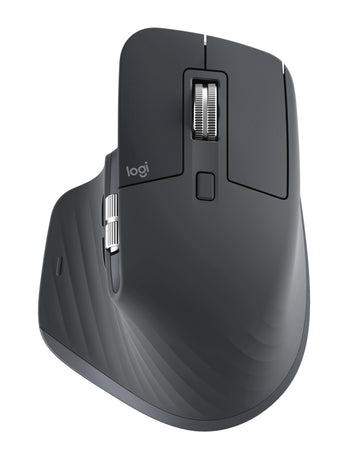
Logitech MX Master 3S Wireless Mouse (Bluetooth, Silent Clicks) - Graphite
Estimated delivery
Includes R 0 already in your cart


Experience ultimate productivity with the Logitech MX Master 3S. Featuring quiet clicks, an 8K DPI sensor that tracks on glass, and a MagSpeed electromagnetic scroll wheel for precision and speed.
This is the Bluetooth Edition (910-007501) in Graphite. It connects over Bluetooth Low Energy and does not include a Logi Bolt USB receiver. Seven customisable buttons, a gesture button and a thumb wheel can be set up in Logi Options+ on Windows and macOS, and a one-minute quick charge gives you three hours of use.
Key Features
- Quiet click technology
- 8,000 DPI Darkfield high-precision sensor that tracks on glass (200-8,000 DPI)
- MagSpeed electromagnetic scrolling with smart-shift, plus thumb wheel
- Ergonomic design with thumb controls and gesture button
- 7 customisable buttons via Logi Options+
- Rechargeable 500 mAh battery: 3 hours of use from a 1-minute quick charge
- Bluetooth Low Energy connection with up to 10 m wireless range
Technical Specifications
| Brand | Logitech |
| Model | MX Master 3S Bluetooth Edition (910-007501) |
| Connectivity | Bluetooth Low Energy (Logi Bolt receiver not included) |
| Color | Graphite |
| Sensor | Darkfield high precision |
| DPI | 200-8,000 DPI (nominal 1,000 DPI) |
| Buttons | 7 (Left/Right-click, Back/Forward, App-Switch, Wheel mode-shift, Middle click) |
| Scroll Wheel | Yes, with smart-shift; thumb wheel; gesture button |
| Durability | Left/right buttons: 10 million clicks; PTFE feet: 250 km |
| Battery | Rechargeable Li-Po (500 mAh) |
| Wireless Range | 10 m |
| OS Support | Windows 10, 11 or later; macOS 10.15 or later; iPadOS 14 or later; iOS 14 or later; Android 8.0 or later; Linux; ChromeOS |
| Software | Logi Options+ (Windows and macOS) |
| Dimensions | 124.9 x 84.3 x 51 mm (H x W x D) |
| Weight | 141 g |
What's in the Box
- 1 x MX Master 3S mouse
- User documentation
Manufacturer Technical Data
| Product Spec Sheet | Not available for this product |
|---|

You may also like
Browse a range of similar products


Computer Accessories
Step Up Your Tech Game


Frequently Asked Questions
Answers to frequently asked questions
Does NexGen Computing conduct regular security audits?
Yes, we regularly conduct security audits and vulnerability assessments to identify and address potential security weaknesses, maintaining a high level of security and compliance with industry standards.
How can I stay informed about policy changes?
We reserve the right to update or modify our policies at any time. Changes will be posted on our website, and your continued use of our products and services constitutes acceptance of any changes.
Where can I find more information or ask additional questions?
For more information or assistance, please visit our website at www.nexgencomputing.co.za or contact us at [email protected].
How does NexGen Computing handle shipping and delivery?
Orders are processed promptly, with delivery details provided at checkout. Tracking information will be emailed once your order ships.
What is the return and refund policy?
Refunds are typically issued for defective or incorrect items within 14 days of receipt. For detailed information, please refer to our Refund Policy.
Is my payment information secure?
Yes, all payments made on our site are processed securely on our domain using industry-standard security measures. Sensitive data, such as credit card numbers, are processed by PCI-compliant payment processors like Yoco, Paystack, and Peach Payments.